
You can easily access the account, explore games, and manage deposits without installing a separate app. This approach keeps the experience simple while allowing players to use Tip-top Bet on most modern smartphones and tablets.
Who Can Use Tip-top Bet on Mobile?
Tip-top Bet can be accessed by players aged 18 or older using Android phones, iPhones, or tablets with an updated browser such as Chrome, Safari, or Edge.
A stable internet connection helps ensure smooth page loading and reliable gameplay. Players can access casino games, sports betting markets, and account management tools using their mobile device.
New users can register an account directly from their phone and complete the verification process if required. Existing players can log in and continue playing on the same account they use on desktop devices.
This allows a consistent experience whether players are using their phone, tablet, or computer.
How to Add Tip-top Bet to Your Device
Follow the steps below to add Tip-top Bet to your device for faster access.
On Android Devices
Step 1: Open Google Chrome on your Android phone.
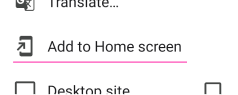
Step 2: Visit the official Tip-top Bet website. Tap the three-dot menu in the browser.
Step 3: Select Add to Home Screen. Tap Add to confirm.
After completing these steps, the Tip-top Bet shortcut will appear on your home screen. Opening it launches the platform quickly through your browser.

On iOS Devices
Step 1: Open Safari on your iPhone or iPad.
Step 2: Go to the Tip-top Bet website.
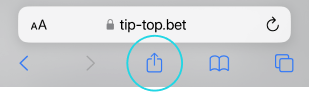
Step 3: Tap the Share icon at the bottom of the screen.
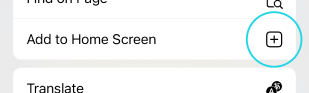
Step 4: Scroll down and select Add to Home Screen. Tap Add to confirm.
Once added, the Tip-top Bet shortcut will appear on the home screen and can be opened directly from there.

Using Tip-top Bet on Your Phone
After adding the shortcut, players can access Tip-top Bet with a single tap. The platform provides access to casino games, live tables, sports betting markets, and account settings.
Keeping your browser up to date helps ensure the best performance. A stable Wi Fi or mobile data connection generally provides smoother loading and gameplay.
Players can also manage deposits, withdrawals, and account settings directly from their mobile device without needing additional software.
Tip-top Bet is designed to work across different screen sizes, allowing players to access the platform comfortably on both phones and tablets.
FAQs
How can I use Tip-top Bet without downloading an app?
You can open Tip-top Bet in your mobile browser and add it to your home screen for quick access anytime.
Does Tip-top Bet work on Android devices?
Yes, Tip-top Bet works on most Android phones using an updated browser such as Google Chrome.
Can I access Tip-top Bet on iPhone?
Tip-top Bet can be accessed through Safari and added to the home screen for faster mobile access.
Do I need to install additional software to use Tip-top Bet?
No extra software is required. A mobile browser and an internet connection are all that is needed to use Tip-top Bet.
Is an internet connection required to play?
Tip-top Bet requires an active internet connection to load pages, play games, and process account activity.


